How it works
From the door to the document.
DOORSHA Inspect follows the order the work actually happens in. Each stage adds to one record, and the record is what the report is made from.
- 01
Arrange the visit
Where flats have to be entered, set up a visit for the building and give each flat a private booking link, on a printed letter or from your own email. Residents choose a time on their phone. This step is optional and is switched on company by company.
- 02
Inspection setup
An inspection carries the building, the client, the address, a document number, the inspection date and the inspector. The rating the building requires is recorded here with where that requirement came from, so every door is measured against something stated.
- 03
Door identification
Each door is recorded with its type, number, floor and position. Stick a blank DOORSHA label on it and scan it, and that label is the door from then on. The observed rating is recorded alongside the evidence for it.
- 04
Component findings
Frame, hinges, lockset, glazing, seals, closer, structure, signage, gaps and leaf each take one of four results: pass, recommendation, fail or not applicable. A fail or a recommendation requires a finding in words.
- 05
Measurements
Gaps are measured at head, hinge, lock and threshold. Where a measurement contradicts the result recorded against it, the inspection says so and the pass does not stand.
- 06
Photographs and plans
Photographs are attached to the door they belong to. Where the building has a floorplan on file, the door can be placed on it with a tap.
- 07
Review
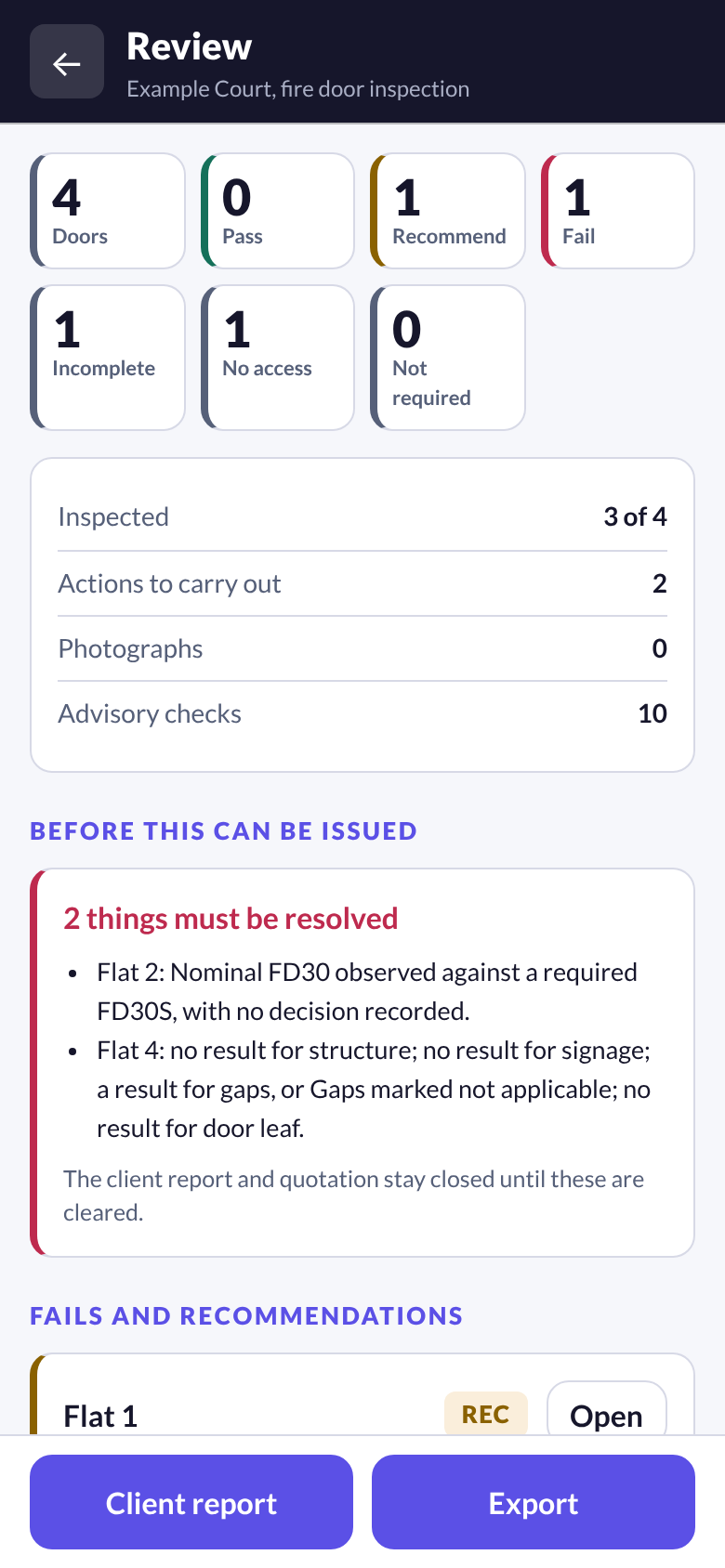
One screen counts the doors by result, totals the actions and photographs, and lists everything outstanding. Nothing can be issued while something mandatory is unresolved, and the list says what and which door.
- 08
Report
The client report opens with the summary, lists the actions one to a line, and then gives a page per door with the results, findings, measurements and photographs. Send it as a link or a PDF, or print it.
- 09
Quotation
Remedial actions are priced from your own rate card and totalled by door. Recommended work is listed in a section of its own and is not added to the total.
- 10
Client portal and the next visit
The issued report appears in your client's portal with its figures and actions. The building keeps its doors, labels, plans and documents, so next year begins with Start a reinspection, not a blank list.
Results
Four outcomes, kept apart.
A door that nobody could get into is not a door that passed, and a half finished record is not a clean one. DOORSHA keeps them separate in the capture, in the counts and in the report.
Fail
A component does not meet what the door has to achieve. A fail needs a finding and an action before the report will be produced.
Recommendation
Work worth doing that is not required. It is reported and priced separately, and it is never added to the remedial total.
Incomplete
A door that was started and not finished. It is counted as incomplete, never as a pass, and it holds the client report until it is resolved.
No access
A door that could not be inspected, with the action needed to get access. The report states that it was not inspected.
Professional judgement
The inspector decides. The software keeps the record.
DOORSHA does not assess a door, does not certify anything and does not confirm compliance with any legislation or standard. It records what a competent inspector found, checks that the record supports the document being produced, and refuses to produce one that would state something the record does not support. The judgement, and the responsibility for it, remain with the inspector and the issuing company.
Report branding
The issuing company leads the document.
A report given to a client carries the name and logo of the inspection company that issued it, together with the inspector, the scope, the date and the limitations. Where it is configured, DOORSHA is credited discreetly in the footer. DOORSHA is never presented as having carried out or certified the inspection.
Next step
Walk through it with one of your own jobs.
A demo covers bookings, labels, capture on a phone, the review stage, both documents and the client portal.